Posts
Hello everyone 👋 Remember when I wrote relatively recently that Qualcomm bought Arduino?…
November 11, 2025 at 8:01 PM•Max Knyazev is typing…Telegram mirror
Hello everyone
👋
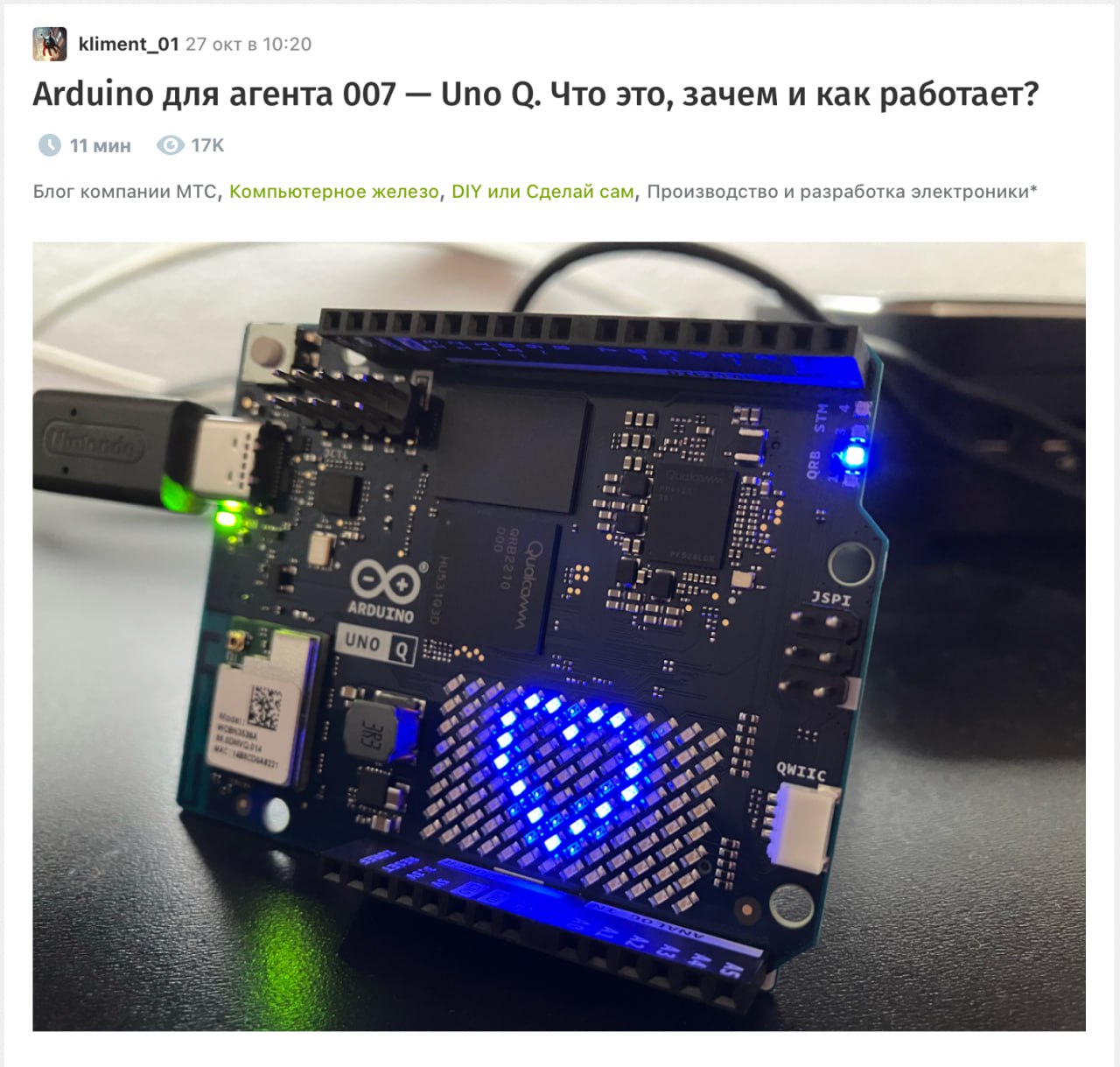
Remember, I'm relative recently wrote, that Qualcomm bought Arduino? So, we have details on the most interesting new product - Arduino Uno Q. A volumetric one has been released on Habré analysis, I recommend reading it in its entirety if you are interested. Here we will briefly go over the main jokes of the board in order to understand what kind of beast it is and why it is needed
💀
The interesting thing is that the board is a hybrid: single-board on Linux + classic Arduino in the Uno R3 form factor. The pins are in place, the shields are compatible, but under the hood it’s a completely different world. The Qualcomm Dragonwing QRB2210 SoC is responsible for the “top”: four 64-bit cores ( Cortex-A53 level architecture ), Adreno 702 graphics with support for OpenGL ES/Vulkan/OpenCL, plus DSP/Hexagon for video processing and ML acceleration. Behind the “bottom” is the STM32U585 microcontroller ( ARM Cortex-M33 @160 MHz ) with TrustZone and Zephyr RTOS
In terms of hardware, everything looks great: LPDDR4 2 GB, eMMC 16/32 GB ( Debian 13 is pouring ), Wi-Fi 5 + BT 5.1, video output via SlimPort bridge, power and all peripherals via a single USB-C
🪄
The board has two operating modes. “Desktop”: connect the hub, Debian loads, then from App Lab you assemble hybrid projects - the CPU part runs in a Docker container, the MCU part is like a sketch on the STM32. Minus - the start is not instant ( the first runs can be noticeably longer than Arduino’s “fill-and-go” ). “Classic”: connect it to a PC like a regular Arduino, upload sketches from the Arduino IDE directly and live in peace. Backward compatibility with shields maintained
What I like here is conceptually. Uno Q closes the eternal dilemma of “taking a microcontroller and sticking shields” or “bringing a Raspberry Pi for the sake of one HTTP client and GPIO.” Now the top-level logic ( HTTP, MQTT, UI, ML ) we give the CPU with Linux, and driver management and polling of sensors in the RTOS to the microcontroller. In my opinion, this is an excellent candidate for not too complex mobile robots, where stable drives and sensors are critical at the bottom, and logic, navigation, object detection, etc. at the top. The goal of Uno Q is to make starting such projects as easy as possible. Arduino was originally about educational purposes, but all this makes the board suitable for teaching schoolchildren, because the barrier to entry is lower and the wow effect is higher than before
😅
In short, if you ever ran into the limits of Uno/ESP and at the same time did not want to carry an entire SBC for the sake of network/video - read article on Habré, it solves many questions regarding the practical use of Uno Q
P.S. If you like this post, I will buy myself an Ardu ino Uno Q and I’ll show you with my example what cases can be implemented on it))
#internet_things
Open original post on TelegramRemember, I'm relative recently wrote, that Qualcomm bought Arduino? So, we have details on the most interesting new product - Arduino Uno Q. A volumetric one has been released on Habré analysis, I recommend reading it in its entirety if you are interested. Here we will briefly go over the main jokes of the board in order to understand what kind of beast it is and why it is needed
The interesting thing is that the board is a hybrid: single-board on Linux + classic Arduino in the Uno R3 form factor. The pins are in place, the shields are compatible, but under the hood it’s a completely different world. The Qualcomm Dragonwing QRB2210 SoC is responsible for the “top”: four 64-bit cores ( Cortex-A53 level architecture ), Adreno 702 graphics with support for OpenGL ES/Vulkan/OpenCL, plus DSP/Hexagon for video processing and ML acceleration. Behind the “bottom” is the STM32U585 microcontroller ( ARM Cortex-M33 @160 MHz ) with TrustZone and Zephyr RTOS
In terms of hardware, everything looks great: LPDDR4 2 GB, eMMC 16/32 GB ( Debian 13 is pouring ), Wi-Fi 5 + BT 5.1, video output via SlimPort bridge, power and all peripherals via a single USB-C
The board has two operating modes. “Desktop”: connect the hub, Debian loads, then from App Lab you assemble hybrid projects - the CPU part runs in a Docker container, the MCU part is like a sketch on the STM32. Minus - the start is not instant ( the first runs can be noticeably longer than Arduino’s “fill-and-go” ). “Classic”: connect it to a PC like a regular Arduino, upload sketches from the Arduino IDE directly and live in peace. Backward compatibility with shields maintained
What I like here is conceptually. Uno Q closes the eternal dilemma of “taking a microcontroller and sticking shields” or “bringing a Raspberry Pi for the sake of one HTTP client and GPIO.” Now the top-level logic ( HTTP, MQTT, UI, ML ) we give the CPU with Linux, and driver management and polling of sensors in the RTOS to the microcontroller. In my opinion, this is an excellent candidate for not too complex mobile robots, where stable drives and sensors are critical at the bottom, and logic, navigation, object detection, etc. at the top. The goal of Uno Q is to make starting such projects as easy as possible. Arduino was originally about educational purposes, but all this makes the board suitable for teaching schoolchildren, because the barrier to entry is lower and the wow effect is higher than before
In short, if you ever ran into the limits of Uno/ESP and at the same time did not want to carry an entire SBC for the sake of network/video - read article on Habré, it solves many questions regarding the practical use of Uno Q
P.S. If you like this post, I will buy myself an Ardu ino Uno Q and I’ll show you with my example what cases can be implemented on it))
#internet_things
Discussion
Comments
Comments are available only to confirmed email subscribers. No separate registration or password is required: a magic link opens a comment session
Join the discussion
Enter the same email that you already used for your site subscription. We will send you a magic link to open comments on this device
There are no approved comments here yet