Projects
DeliveryRobotFirmware
DeliveryRobot This repository contains code for flashing the ESP32 C3 firmware as part of the modernization project for the official toy courier robot from Yandex. The robot is controlled using a mobile application in t…
About the project
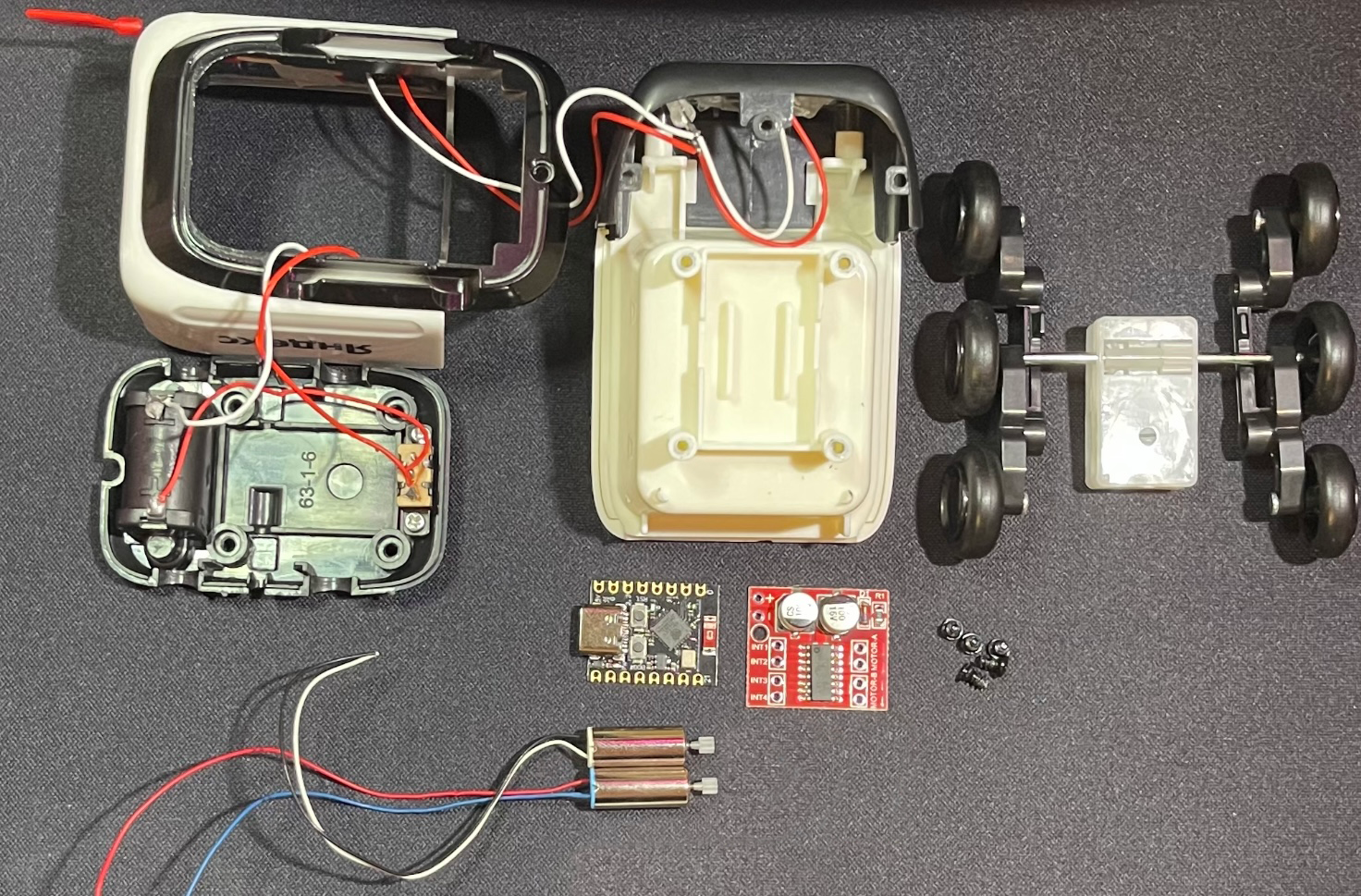 #DeliveryRobot
This repository contains code for flashing the ESP32-C3 firmware as part of the modernization project for the official toy courier robot from Yandex. The robot is controlled using a mobile application in the [DeliveryRobotApp] repository (
https://github.com/MaxiEnergy/DeliveryRobotApp
) and Bluetooth Low Energy technology. You can read more about the modernization of the robot courier in the article on Habré.
#DeliveryRobot
This repository contains code for flashing the ESP32-C3 firmware as part of the modernization project for the official toy courier robot from Yandex. The robot is controlled using a mobile application in the [DeliveryRobotApp] repository (
https://github.com/MaxiEnergy/DeliveryRobotApp
) and Bluetooth Low Energy technology. You can read more about the modernization of the robot courier in the article on Habré.
Contents
- Technology and component stack
- Description of functionality
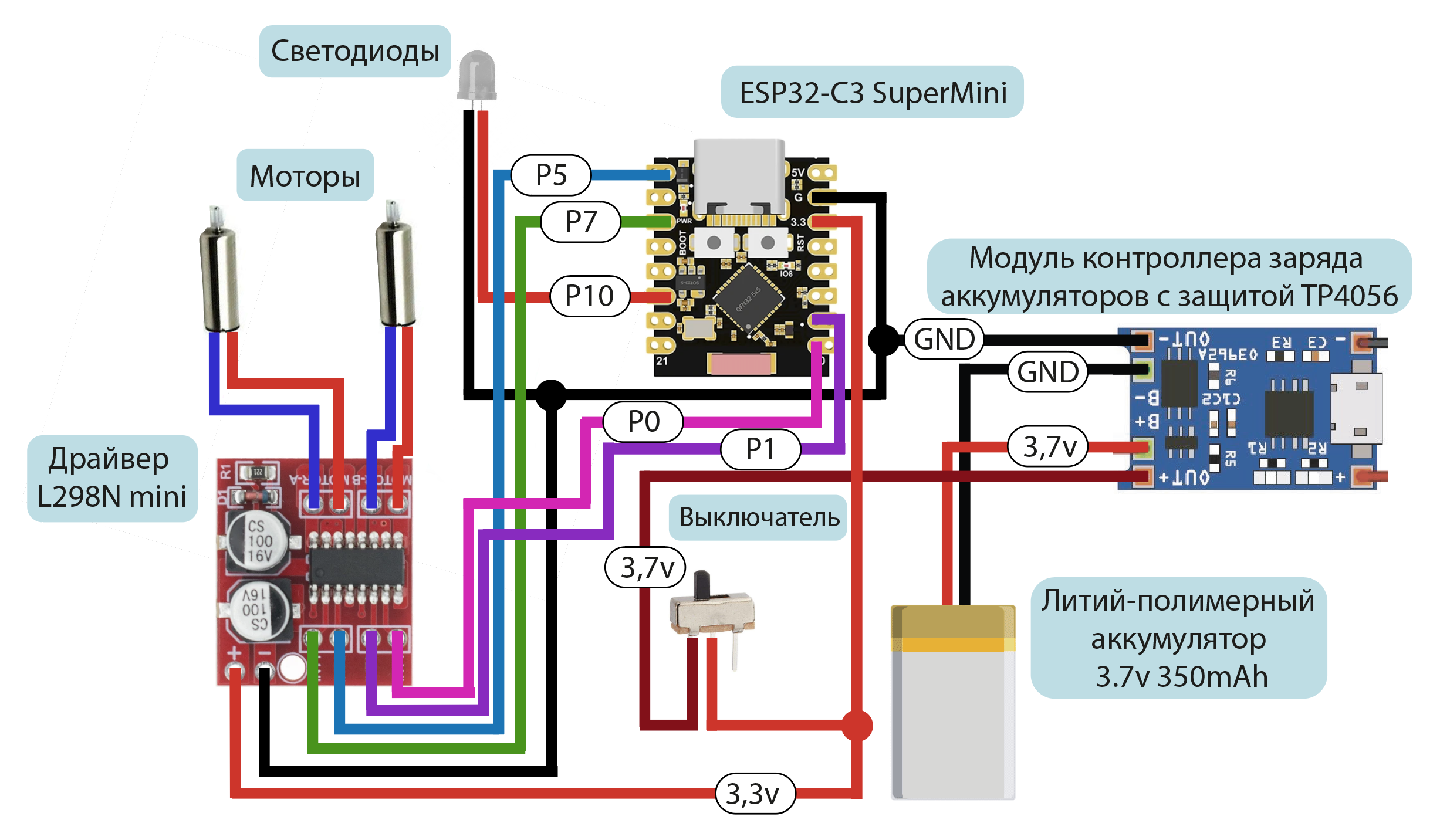
- Electronic components connection diagram
- Demonstration of the application with a robot courier
- Additional materials
Technology and component stack
Software part
- C++ programming language
- Arduino IDE development environment
- IMPORTANT: the firmware is written for ESP version 2.0.16. It will not work correctly on 3.x.x versions. Install an older version of ESP32 by Espressif Systems in the board manager
Hardware
- Lithium polymer battery 350 mAh
- Battery charge controller module with TP4056 protection
- L298N mini motor driver
- ESP32-C3 SuperMini
- 2 motors
- Single-color LEDs of the courier robot
- Switch on the robot courier
Description of functionality
- Turning the robot courier on and off is done using the original switch on the bottom of the toy
- Turn the robot's LED lights on and off via a mobile app using BLE
- Motors are controlled using arrows in the mobile application
- Rotation of the robot is carried out by simultaneous rotation of two motors in different directions
Connection diagram for electronic components
Demonstration of how the application works with a robot courier
Additional materials
Read about the creation of this application in article on Habré
##Links
- GitHub: MaxiEnergy/DeliveryRobotFirmware
How this work connects to others
272 stars · 289 connections
Explore the connections between materials on the star map.
A few materials from the map
- And here is the podcast itself 🤩 We filmed it entirely on our own, so don't jud…
- Who is hired for information security?
- Friends, hello everyone 🫶 Today @maxigacy and I will be recording a podcast for…
- The series "Mr. Robot" is already more than 10 years old. I remember watching i…
- I soldered myself an addon for a badge🤌 To be honest, I haven’t soldered anythi…
- Hello everyone 🙃 Today we are hanging out at one of the largest annual security…
- Situation: a colleague of one of my close friends had his account hacked. His b…
- Attention everyone, I was hacked and tried to blackmail me Well, that’s it, the…